Backing tracks made with RealTracks only
Note: You don’t need the Band in a Box program to play these backing tracks
 |  |  |  |  |  |
 |  |  |  |  |  |
TheGuitarBand.com: Your Source for Band-in-a-Box Backing Tracks and Templates

Welcome to TheGuitarBand.com, your go-to website for a wide range of Band-in-a-Box backing tracks and templates.
Before we dive in, please note that we do not promote or sell any software mentioned on this site, such as Band-in-a-Box or MiniLyrics. If you don’t already have these programs, you can find them on the respective authors’ official websites.
All the tracks available on our site are instrumental, devoid of vocals and solo parts, making them ideal for one-man band singer-guitarists like yourself.
With Band-in-a-Box, you have the flexibility to customize various elements such as instruments, keys, and more, without compromising the quality of the tracks. The program’s integration of “Real Tracks,” which are audio recordings performed by real musicians, ensures an authentic sound that surpasses artificial MIDI arrangements.

Feel free to explore our extensive collection of completed MP3 tracks available for free download. However, we understand that certain tracks may not perfectly match your specific requirements.
While most Band-in-a-Box backing tracks found online retain the original key, TheGuitarBand.com takes a slightly different approach by offering original and unique tracks that align with the original style, while also catering to vocalists who prefer lower keys.
Download your preferred songs and keep in mind that if you wish to customize them further, you will need the Band-in-a-Box program. With this program, you can create and modify “SGU” files, with similar potential to MIDI files but with enhanced capabilities.
You’ll find a variety of SGU files readily available on our site, or you can opt for the premium collection, which offers a convenient single download of all the tracks.
Best of luck with your musical endeavors!
Giancarlo / Admin
What is Band in a Box?
Think of musicians who have recorded instrumental parts in different keys and musical genres. The BiaB program stitches these parts together according to your commands, resulting in a real-sounding backing track, as if it were made in a recording studio!
How To Play the BiaB Mp3. How to Edit the Lyrics.
If you download the free backing tracks you may be interested in knowing how to use them and how to edit the lyrics. Here a video guide:
This video can also be useful if you download the complete mp3 + lyrics collection.
To show the lyrics download the LRC software : Mini Lyrics https://www.crintsoft.com/
Easy video tutorials band-in-a-Box
Band in a Box difficult? Don’t get distracted by too many Band in a Box functions.
To create your song you only need these buttons. Watch the video tutorials!
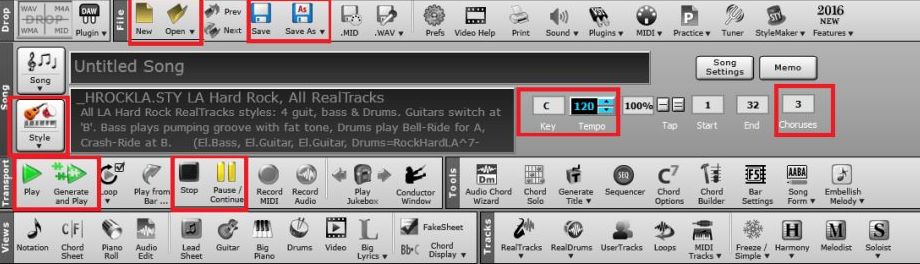
Many “.sgu” files are ready to be exploited as practice, and downloadable for free.
What are Backing Tracks
Backing Tracks are songs that contain musical accompaniment parts.
In these there are no melodies, leaving the soloist room to play, and possibly sing alongside it.
EXAMPLE OF BAND-IN-A-BOX BACKING TRACK
Eagles / Peaceful Easy Feeling.mp3
Normal Backing Tracks Types
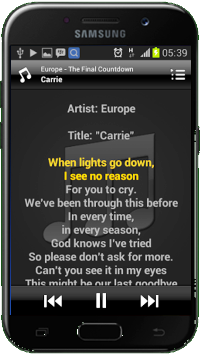
1. AUDIO
All songs that have sounds and notes created by actual musical instruments.
Can be played by computers or smartphones, as the mp3 songs.
You will not be able to change the tonality, nor other parameters, as instrument type etc.
2. MIDI
It is an exclusively digital format and can be played only by some specific players, but also computers or smartphones that have installed the appropriate software.
The sounds are virtual, “electronic”, although the midi will try to reproduce the real sounds.
You can vary virtually all of the parameters, tone, presence and type of instruments.
The audio quality is high, but the musical output can be poor as they attempt to imitate real life sounds, giving of an “artificial” tone, so they are not usually advisable for the musician who are using them as an accompanied piece.
Read: Mp3 or Midi?
Keys of the Backing Tracks
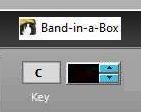
The key of a song is chosen according to vocal and instrumental requirements, as some arrangements make it better in different keys. Sometime they’re even simpler to play on an instrument.
The original singers logically have vocal qualities which is often higher than the average.
The average musician will sometimes need to modify the original key according to how it suits them. In addition, man and woman have different vocal characteristics, and the same song originally sung by a man, will often be transposed into a different key by a female singer. There are numerous examples of covers in this respect.
The band-in-a-box backing tracks of this site are sometimes in different key than the original, as they are made for personal needs, that is to say to my own vocal requirements, that sometimes require one or two tones under the original, as well as for my daughter also, to accommodate a female voice.
Of course, whoever needs different keys of their own, will choose to make the songs themselves through Band-in-a-Box, or search for the “sgu” version.
Download your full sgu collection
How to make a track
There are multiple approaches to creating a backing track.
When you buy a video card, you’d often receive a free music editing software, if you have the skill to play various instruments, you may record these parts to an accompaniment.
For simplicity, and saving time, you can assemble tracks played by actual musicians with a suitable software. For this I use Band-in-a-Box (BiaB).
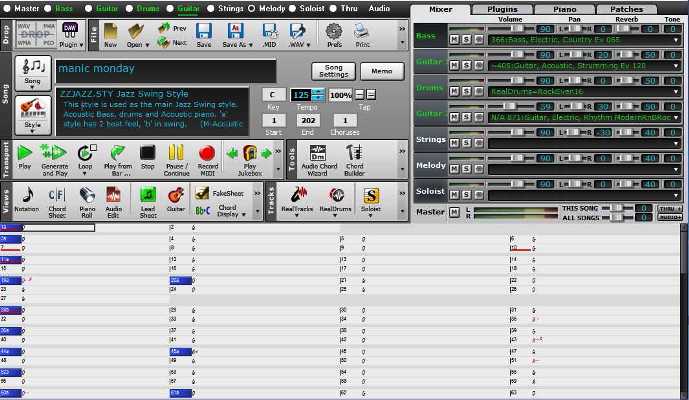
In addition to the program, you will need files that contain “RealTracks”, so called by the BiaB.
After being satisfied with the music you’ve created through BiaB, set the time, notes, verse and chorus, instrumental parts etc. and finally export it, it will certainly not be identical to the original, but it can be a unique and interesting twist in and of itself.
Here you will find free backing tracks realized through band-in-a-box, and should you want to tweak them, you may do so through the BiaB program.
Read: Tutorials relating to the creation of BiaB backing tracks.
Have Band in a Box?
With my sgu files you can quickly create your own original and professional sounding repertoire. Here’s how! (Apologies for the synthetic voice, my English would be hard to understand 🙂 )
Music players for live performance
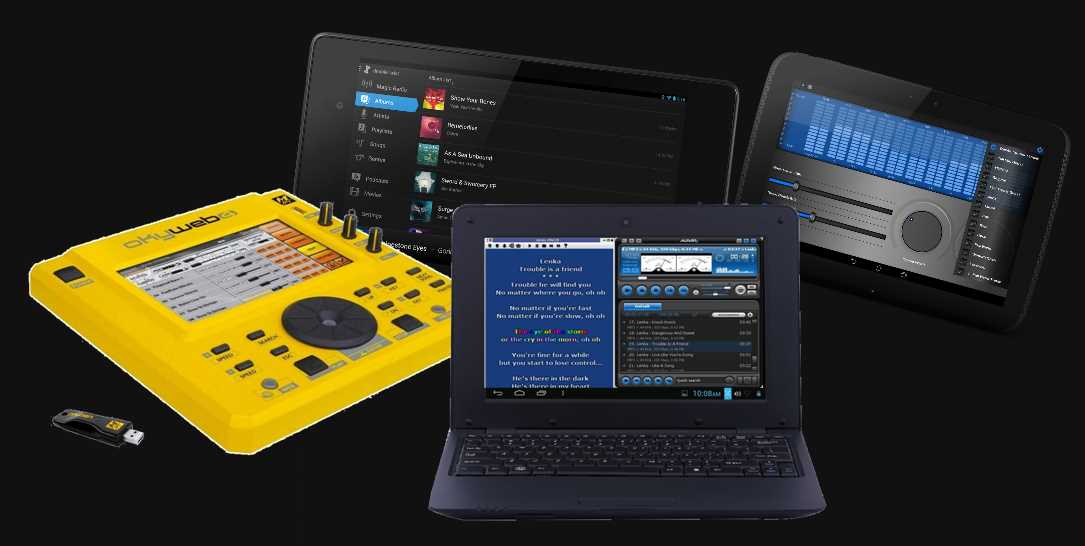
Features required for an mp3 player
A good audio player must meets specific requirements for your live performances. Essential features needed to enhance your musical experience and keep your performances seamless and professional.
- Easy Song Navigation: Choose an MP3 player that allows you to view the song list and effortlessly scroll through it while the program is playing. This ensures smooth transitions between songs without any disruptions.
- Visible Play Button: Opt for a player with a clearly visible play button to avoid any accidental errors during your performance. Instantly start the reproduction with confidence.
- Automatic and Readable Lyrics Display: For duos or singers who require lyrics during their performances, select an MP3 player that automatically and comfortably displays readable lyrics. Rest assured that all the songs provided include synchronized lyrics (mp3+lyrics) for your convenience.
- Netbook Solution for Live Performances: Unless you require a professional-grade player that also displays lyrics automatically, consider using a small netbook (a compact laptop) as an excellent solution. It allows you to install player software such as Windows Media Player or AIMP, along with compatible lyrics software like MiniLyrics (refer to the Lyrics Tutorial).
- Convenient Song Control: Ensure that your MP3 player allows you to scroll through playlists and start a song using the enter key or a USB numeric keypad. Program the keys for functions like search, startup, stop, and more, simplifying your performance workflow.
- End of Song Reproduction: Avoid songs automatically moving on to the subsequent track. Choose an MP3 player that plays each song until its conclusion.
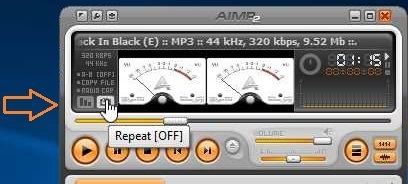
- Silent Space and No Repeat: To avoid any issues, all the tracks provided have a minimum 30-second silence space at the end. This gives you ample time to search for the next song or stop the reproduction. Ensure your MP3 player has the option to disable repeat and autoplay random features.
- Music Player on Android: If you prefer using a tablet or smartphone for your performances, explore the various free apps available on the Android platform (“.apk” software). Look for players that support lyrics display, adding a karaoke-like element to your performance.
- Simultaneous Lyrics Display and Search: One challenge arises when searching for the next track while the current song is in progress. Ideally, you need an MP3 player with two windows—one displaying the lyrics and the other for the search list. This enables seamless selection and immediate playback without interrupting the displayed lyrics.
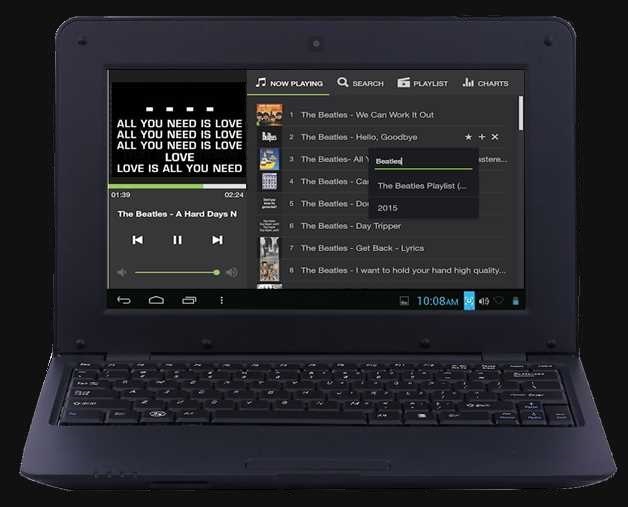
If you’re struggling to find the right player that meets these requirements, another option is to purchase the complete collection of SGU and MP3 files at an incredibly low price. Included as a gift is “The Music Player Android for Musicians,” the player used for live performances.
“The Music Player Android for Musicians” is an exclusive player designed specifically for live performances. Unlike other online players, it caters to musicians by offering automatic playback of music and synchronized lyrics. It supports LRC lyrics and includes essential functions that complement performances with ready-made Band-in-a-Box backing tracks.
Unlock the full potential of your live performances with an MP3 player that meets your needs.
You must absolutely avoid autoplay random and repeat, which occurs whenever a music has concluded.
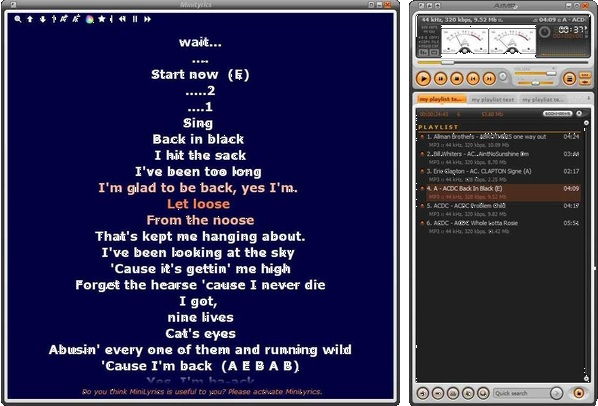
Music Player Android for Musicians

An exclusive player for our live audience !
Similar programs such as this are not available on the web. Although there are various musical players online, it is challenging to find a suitable program for musicians that also provide automatic playback of their music/lyrics.
This APK player is an ideal complement to live performances with my ready-made Biab Backing tracks.
The program supports LRC lyrics and has the following essential functions for those who perform live.
1. Keep the screen on
2. The font size of the lyrics
3. Pause after each song
4. Highlight Lyrics Color
5. Normal Lyrics Color
6. Background Color
7. The text align mode of lyrics
8. Equalizer
9. Playlist creator
10. Folders:
a. Artist
b. Albums
c. Songs
d. Folder
e. Playlist
This free player is included for free in the full collection.


 Join our Telegram group: Band in a Box Backing Tracks.
 Join our Facebook group (download/share backing tracks): SGU BackingTracks
Hi, can i remotely hire you for an hour or two at all|? i got bb in 2019, its never worked, its never even properly installed, im totally confused by the many instruction, cannot connect audio interface for guitar/ mic, just too confused by bb support and all their many many varios and ambiguous instructions, ie use MME, and yet when i ask on forums etc they say dont, and ASIO4ALL is also crap.
All i have done is explore styles [ why do they have such crap names?? , why not just call them BLUES 1 to 10 for instance??? ] however i then discovered many were,nt even there [ not loaded] then had 3 hours remote support from bb, i now have ERROR 1, I still have AUDIO SETTINGS DONT MATCH?? Cant change tempo without TYPICAL TEMPO IS whatever, basically it never reacts and never has in accordance with any video or tutorial i,ve watched including yours!! All i ,ve had is problem after problem, when i asked whats a set of “Default” settings just to get the fucking thing working, they say there are none………………WTF? I,d be happy to pay you for a few hours just to check its all there and get these settings set !!! I have soo many issues with this i dont know where to start !! Never had a moment joy or use from it since 2019. I think its broke !! Thanks.
Hi I understand your frustration, but I am unable to help people personally. Did you follow the simple tutorials on the site? You shouldn’t have any problems getting started on the right foot. The truth is that BiaB has a number of features that are beyond my experience as a backing track creator.
Sincerely
Giancarlo
HEY GURU,
I OWN YOUR SGU 661 FILES…
HOW CAN I DOWNLOAD MORE OF YOUR TOP BASES! THANKS ALREADY READY …Juha Finland
Hi Jusa,
nice to hear from you,
You can buy the recently updated collection, many new backing tracks have been updated, the demo tracks have been eliminated and 154 new acoustic tracks are included, but they can also be used like the others by adding the real tracks, such as bass and drums.
New name SGU BiaB Collection 613 FILES (+free acoustic 154 sgu files). $39
https://www.theguitarband.com/biab-sgu-backing-tracks-download/
Later I will send you separately the sgu that I still have on my computer and that I haven’t uploaded yet 🙂
I am brand new to biab. Have no idea what I am doing yet. NEED HELP.
I am interested in your products for sure.
Do you know if I can export from Chordify to I biab or other programs so I don’t set there typing etc, or other programs that might do it.
I have a Mac. Bought the Ultra Pac.
Sure need help.
Thanks for the useful info. I play the saxophone and I’m looking for a software which can help me practice. Band ina box seems powerful but is expensive! I also found JJazzlab, which looks easier to use and is free. Do you know how does it compare ?
I don’t know. if someone knows it can answer here
Do these work well with BB on the Mac?
yes
Hi, I am working on compiling backing tracks for traditional Christian songs, see tiny.cc/gospelsongs for the Youtube collection. I am happy to share any of these files – mp4 or sgu files with anyone who wants them. I am using Karaoke Builder software to make the cdg files. Karaoke players can change the tempo and the key on the fly, so very useful to have.
Hi, I really liked what you are offering, sprung for it…. not I can’t utilize anything. Tried suggested file conversions, they say there are no files. Help? I’m really looking forward to these. Thanks, Dan
Hi Dan,
That is very strange, and an issue that has never occurred before. All it takes is to unpack the file. Or please clarify specifics. if the problem persists I will try to resend the files through a different mean.
Giancarlo, thanks for your reply. I appreciate how quickly you responded. My problem was I was trying to use your directions, which were for Windows users, and I have a Mac. I did resolve the problem, and I may have some help for those who, like me, use a Mac. The Mac App “The UnArchiver” is free, works instantly, easily, and without issue.
Thanks for all your hard work, I’m already at work modifying While my guitar gently weeps
Great, and thank you for the warning!
Thank you Giancarlo! Yes, I already downloaded and extracted with winrar.
I have tried several tracks. They work great!
I just recently purchased band in a box, so I have a long way to go to learn how to accomplish what you have. I plan to edit some tracks and create some of my own. I especially liked how you slowed the rhythm at the end of some songs and muted some instrument tracks for several measures on others.
Thanks again for making these song files available.
Regards,
Richard
I have 2016 pro biab what realtrack sets do i need to match the files you have created? Thanks
These are the RealTracks I have. You’re only required to have some.
If you do not have the same realtracks as mine, you can pick whatever will suit you
My RealTracks.
Let me know if you need more realtracks
I have BIAB on my PC. I want to buy Songs (.sgu ) files. My knowledge of .sgu files is zero.
Do they have the notes on the stave? I have to read the music.I am using BIAB. Would love to know if the Songs that are .
SGU have the music on the screen so it can be read.
I am not familiar with .SGU files, and I would need to read the melody .
Thanks in advance
Pat (SGU files/”I’m waiting for an answer”)
I’ve answered you through emails (21-Nov and 27-Nov), but I’ll add another here in case the mails failed to get through, but should you still encounter problems, contact me through these addresses:
ggriscenko@gmail.com, icgriscenko@gmail.com., Skype: giancarlogriscenko2
\Hi,
Just installed the files and I don’t have the styles that go with these cuts.
Not very good without the styles.
Sorry for the late reply, but I did not receive a notification on my email. What files have you installed?
With BIAB you need the RealTracks of the preferred genre for optimal results.
Let me know what software and its version you have.
Hello.I want to buy your pack of LRC.600 songs.But i want to listen before.Please send me some songs to listen the quality.
After that i proceed to buy the full pack.
My name is Richie Truman.I live in Gran Canaria,Maspalomas,Playa del Ingles.I sing in 14 languages,bla,bla,bla,bla….
Phone number :+0034 693 80 90 41
Hi Richie,
Yes, it is possible to check the quality while downloading the free SGUs here:
https://www.theguitarband.com/sgu-files-2/.
Keep in mind that to play with the best sound possible you will need the proper real tracks.
To assess quality I have uploaded an mp3 ready to be listened to (Sultans of Swing):
Gran Canaria? Good. I’ve play for three years in Tenerife myself (with my BiaB tracks).
Let me know if you need more information.
Giancarlo I noticed you’ve added new files to the SGU package since I purchased my copy. Any chance I could get a link to the new file with the new songs? Thanks.
Of course Krister. I send you the new link by email.
Reply ↓
Thank you for the good support and good work.
Giancarlo I noticed you’ve added 47 new files to the SGU package since I purchased my copy in May. Any chance I could get a link to the new file with the new songs? Thanks.
Of course, Bob. I send you the new link by email.
Hi!
I wrote you a email for about 1 week ago with the same question. Can you please send me the link to?
Sorry Krister, but I cannot find your previous email. In any case I sent right now for free the new update by email.
I have paid and downloaded the BiAB SGU pack. When playing most of the styles are missing.
I have got MAC MegaPack 2016 and 49PAK
Hi Ahmed,
The SGU files do not have styles included by default.
If you have the same backing tracks that I have, they will play exactly the same as the originals.
In most cases you would have to substitute the styles in the sgu song with your own.
Hope this helps.
Resouces: https://www.theguitarband.com/tutorials/biab-tutorial/
How did you get the main page button icons removed. As you said, many of them you will never use and I don’t need. They clutter the work space but I don’t know how you got rid of the ones you didn’t want? I have the Mac version.
On the 2013 version, removing these icons was an easy trick to spot. Now with the 2015 version however, I don’t see how I could delete or move them. I leave the answer to anyone else lucky enough to have found a solution.
How do I download tracks? The click left to save seems to be disabled on your site
Hi Jay,
1. left click on the title
2. right click on the player
3. save as
Hi there,
I wanted to say big thank you for doing this site for free and helping other people.
Thanks for you’re time and efforts.
tOm.
Any yngwie malmsteen tracks
Which would you suggest?
Ciao, hai il link per scaricare la Band in a Box 2014?
so come posso scaricarlo?
Ciao Thiago, davvero non saprei…a meno che non voglia scaricarlo dal sito principale a pagamento. Io ho comprato il CD in Tailandia, dove vivo. Ma non credo sia la versione originale 🙂
Where is access to .SGU files? Would like to download those, so that I can change chords.
Free Samples https://www.theguitarband.com/sgu-files-2/
Full Download https://www.theguitarband.com/instant-full-download/
You can find more info in the page: https://www.theguitarband.com/sgu-files-2/